
Database users and access.
Access in OriginChainDB has two separate layers. Console access decides who can sign in to the dashboard and what they can do there — that's org members and roles, covered on Roles and permissions. Database access decides who can reach the database over the wire and what rows and columns they get back. That's this page.
The two never overlap. Adding a teammate to your org does not give them a database login, and creating a database user does not give anyone a console account.
The Security group.
Everything on this page and the next lives under Security in the console sidebar. Nine entries, in this order:
| sidebar entry | path | what it is |
|---|---|---|
| API keys | /keys | The one shared bearer token per database. Rotate it here. |
| Access tokens | /tokens | Your own personal bearer tokens, one set per database. Rotate and revoke independently of everyone else's. |
| Members & teams | /members | Who can sign in to the console, and their org role. Covered on the RBAC page. |
| Roles & permissions | /roles | The org capability matrix, plus custom roles. Covered on the RBAC page. |
| Database users | /db/users | Principals that connect to the database itself and run queries. |
| Database RBAC | /db/rbac | Database roles and the privilege matrix that grants them access to tables. |
| Row-level security | /db/rls | Per-role row filters on a table, plus a tester for “what would this user see?”. |
| Cluster audit | /db/audit | The hash-chained log of every database user / role / grant / policy change. |
| Audit log | /audit | Org-level activity for the account (members, databases, billing). |
The four /db/* pages act on whichever database is selected in the top-bar picker. Pick it once; every page follows.
Database users.
A database user is a principal that connects to the database and runs queries. Open Security → Database users. The table lists every user with its authentication kind, the roles attached to it, how many API keys it holds, and when it was created. A disabled user is flagged inline.
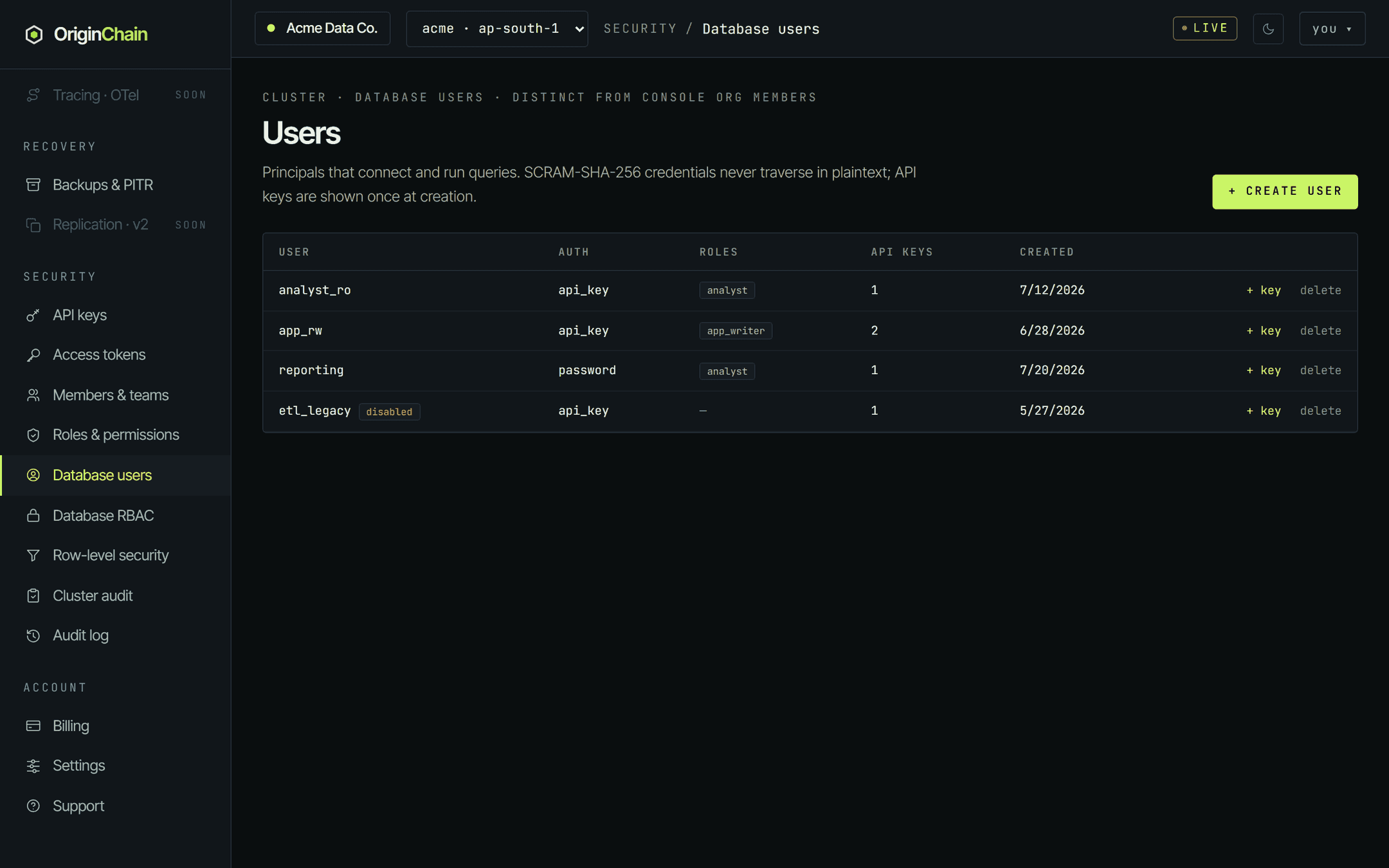
Create a user.
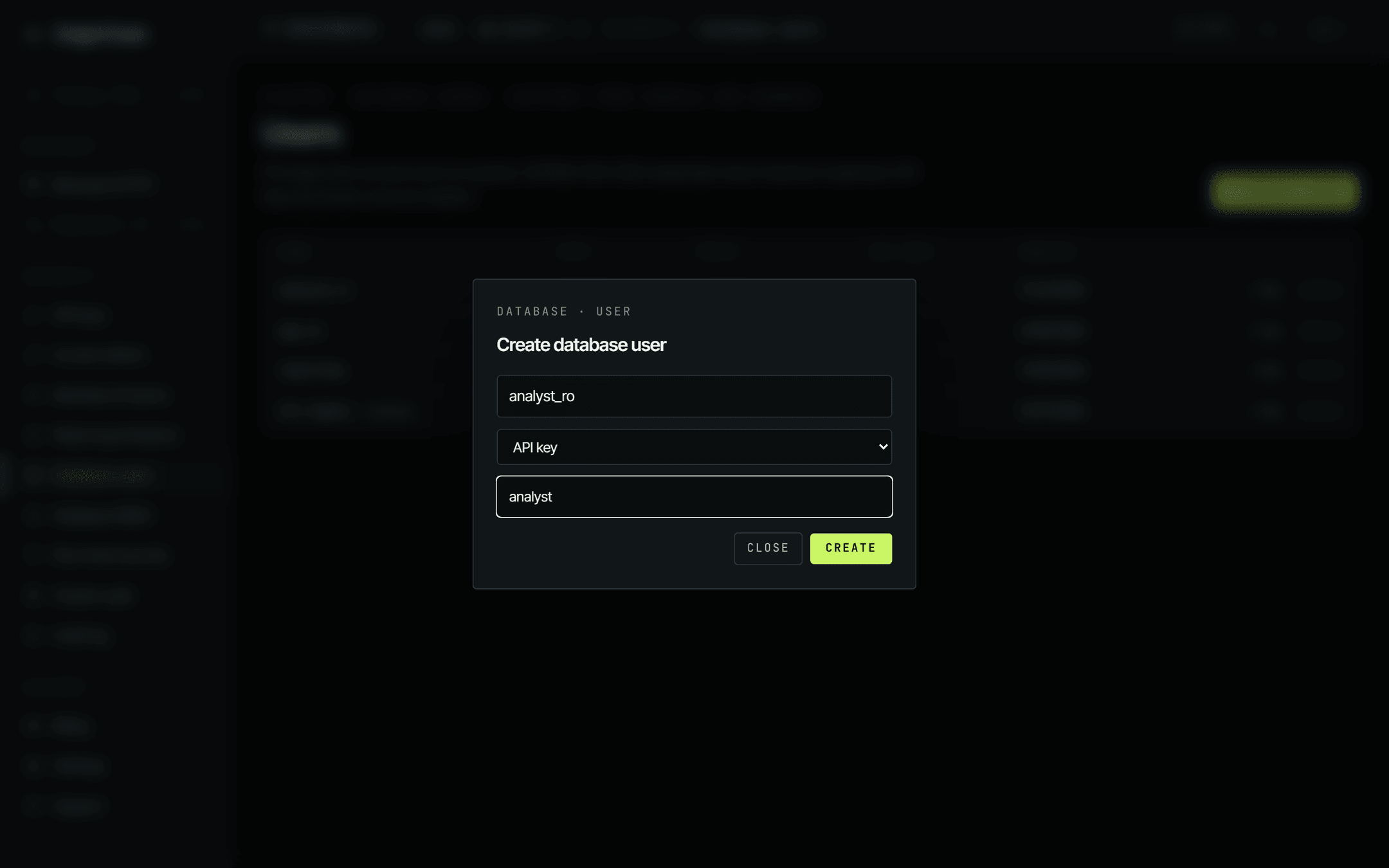
+ Create user opens a dialog with exactly three inputs. There is no read-only switch here — what a user can do comes from the roles you attach and the grants those roles hold, which you set on Database RBAC.
- Username — free text, e.g.
analyst_ro. - Auth — API key or Password (SCRAM). Picking Password reveals a password field beside the dropdown.
- Roles — comma-separated role names that already exist on the database.
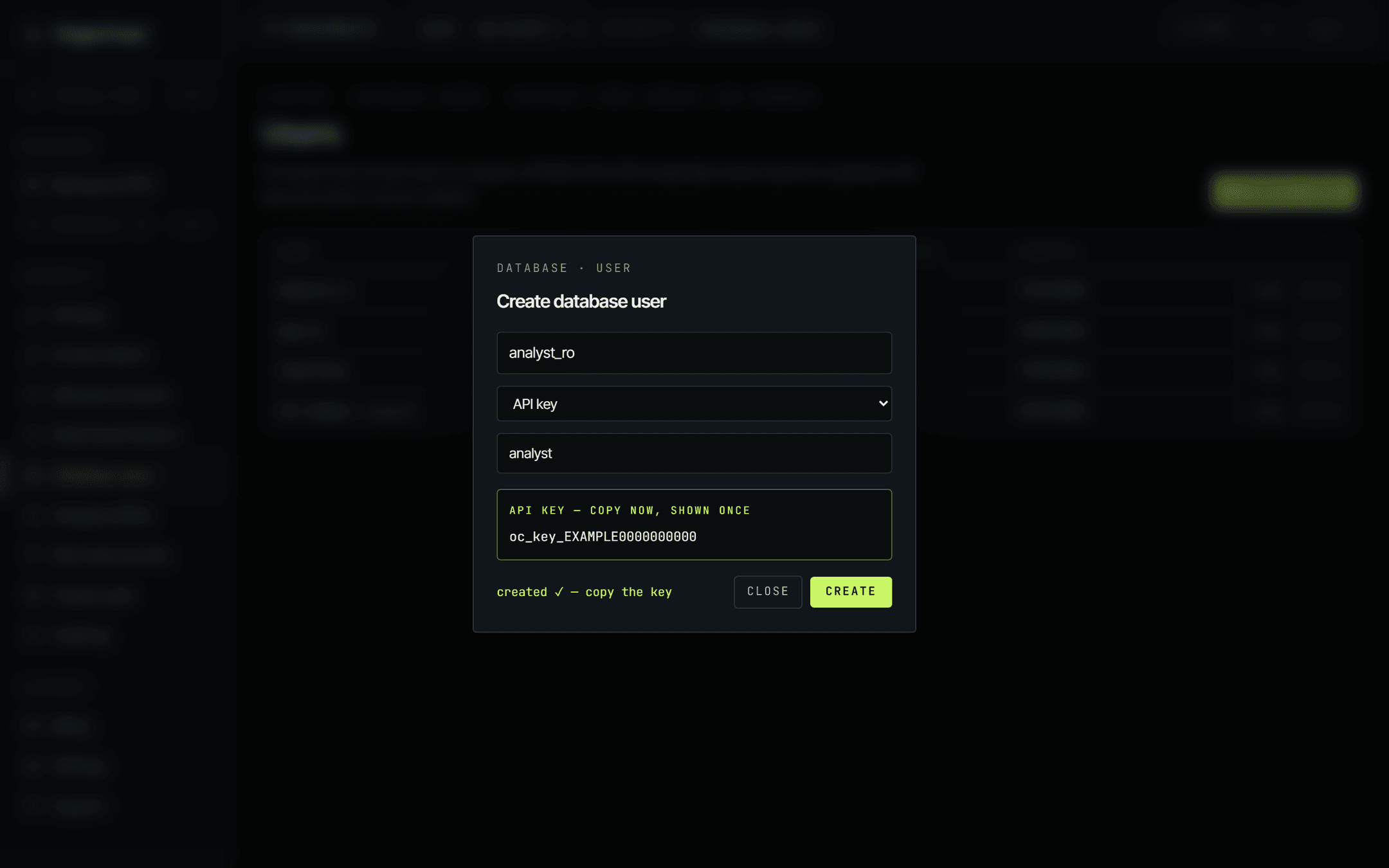
An API-key user's key is returned once, in the dialog, under a API KEY — COPY NOW, SHOWN ONCE banner. Copy it before you close the dialog; the console cannot show it again, because only a hash is stored.
Rotating and removing.
Each row carries two actions. + key issues an additional API key for that user and shows it once, in a browser prompt — useful for handing a second consumer its own credential, or for rolling one over before you retire the old one. delete asks for confirmation and then removes the user outright.
There is no session list in the console, and nothing to "sign out". Deleting a user removes it from the database's authorization store, so the next request that identifies as that user is rejected as unauthorized rather than served. In-flight requests already executing are not interrupted.
Database users are opt-in on the data plane. A request identifies one by sending
X-OC-DB-User and
X-OC-DB-Key alongside the usual bearer.
A request that sends neither runs with the database's own administrative identity, which is a superuser: no role
checks, no column masking, no row filters. That is the behaviour every SDK and every quickstart example gets by
default, and it is the single most important thing to understand on this page — creating users and grants does
not restrict anything until your clients actually present those headers.
A user created with Password (SCRAM) stores SCRAM-SHA-256 credentials, but the HTTP data plane authenticates database users by API key today. Give a password user a key with + key if it needs to issue queries over HTTP.
API keys and access tokens.
The console issues three different credentials, from three different places. They are not interchangeable, and mixing them up is the usual cause of a confusing 401.
| credential | looks like | issued from | scope |
|---|---|---|---|
| Shared database bearer | oc_live_… | API keys | One per database, shared by everyone and every deployed client. Rotate replaces it. Every client still using the old value stops working. |
| Personal access token | oc_u_… | Access tokens | Yours alone, one or many per database. Carries read/write or read-only. Rotate or revoke affects only that token — nobody else's breaks. |
| Database-user API key | issued per database user | Database users | Belongs to a database user, so queries run as that user with its roles and grants. “+ key” issues another; deleting the user removes them all. |
Personal access tokens.
Security → Access tokens lists one card per database, and inside it your own tokens for that database. Give a token a name, optionally tick read-only, and press Create token. Existing tokens can be rotated or revoked one at a time, and each row shows a truncated prefix plus a READ/WRITE or READ-ONLY badge.
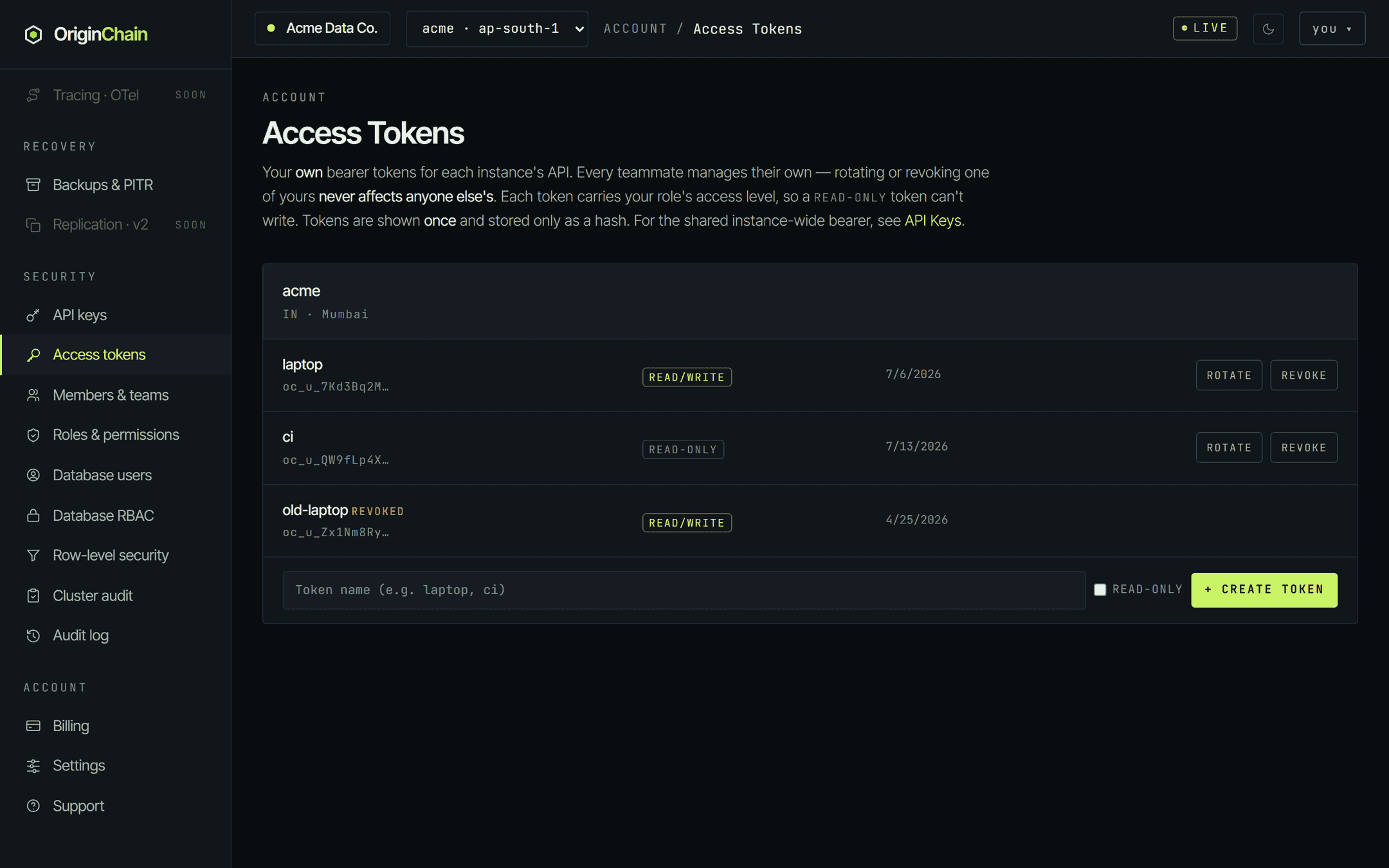
A token's access level is derived from your org role rather than chosen freely: owner, admin and cluster operator mint read/write tokens; every other role, including custom ones, mints read-only. Ticking read-only steps down from that ceiling but never up. The database enforces the restriction: a read-only token is refused on write requests. The level is also re-derived from your current role whenever that database's token set is rebuilt, so a demotion narrows the tokens you already hold.
Every credential the console mints is displayed exactly once, at creation or rotation, and stored only as a hash
afterwards. That is why the Connection tab on a
database shows a literal Bearer <your-token>
placeholder in its example request instead of your real value — there is nothing to display. If you lose a token,
rotate it; you cannot recover it.
If a credential leaks.
- A personal token — revoke it on Access tokens. Only that token stops working; deployed clients using the shared bearer are untouched.
- The shared bearer — rotate it on API keys, then redeploy every client that carries it. This one is disruptive by design: the old value stops working immediately.
- A database-user key — on Database users, delete the user (removing all its keys) or issue a fresh key with + key and move consumers over.
- Then tighten the blast radius: put the source addresses on the IP access list below, and check Cluster audit for authorization changes you did not make.
Network access.
Credentials decide who; the IP access list decides from where. Open your database from Databases and pick the Network access tab.
The default is an empty list, which allows any address. Add a single entry and the rule flips: only the listed ranges can connect, over both HTTPS and the Postgres wire protocol. The status line above the editor spells out which state you are in.
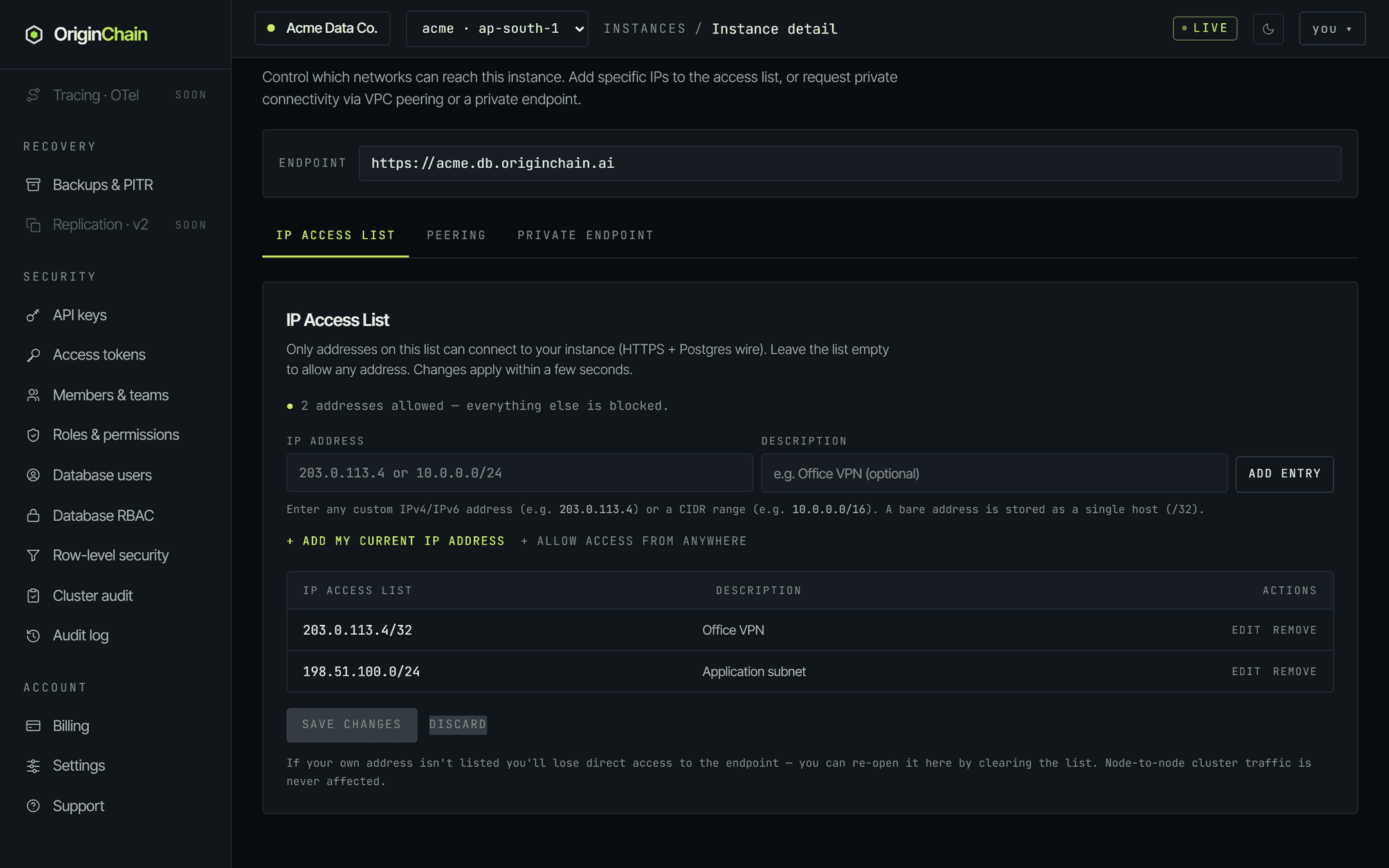
- 1. Type an address or range into IP address. A bare IPv4 address is stored as a single host (
/32); a bare IPv6 address becomes a/128. Explicit CIDR ranges are accepted as typed. - 2. Add an optional Description so the entry still means something in six months, then press Add entry.
- 3. The shortcuts do the obvious things: + Add my current IP address fills in the address you're browsing from, and + Allow access from anywhere appends
0.0.0.0/0. - 4. Press Save changes to apply, or Discard to drop the staged edits. The console says changes take effect within a few seconds.
If your own address isn't on the list you lose direct access to the endpoint. The console keeps working, so you can re-open access by clearing the list. Traffic between the nodes of a multi-node database is never affected by this list.
On a dedicated database the tab carries two more sub-tabs, Peering and Private Endpoint. Both are request forms rather than self-serve toggles: you submit your network details and our team completes the connection and sends back the acceptance details. A free database has neither — the IP access list is its only network control, and the console hides the other two entirely.
Row-level security.
Security → Row-level security attaches a
USING predicate to a
(table, role) pair. When a query reads that table as a user holding that role, rows that fail the predicate
are dropped from the result. With no policies on a table, every role reads every row.
The predicate language the console documents on the page itself is:
=,
!=,
< <= > >=,
IN (…),
IS [NOT] NULL,
AND / OR / NOT,
and CURRENT_USER, which resolves to the acting database
user's name.
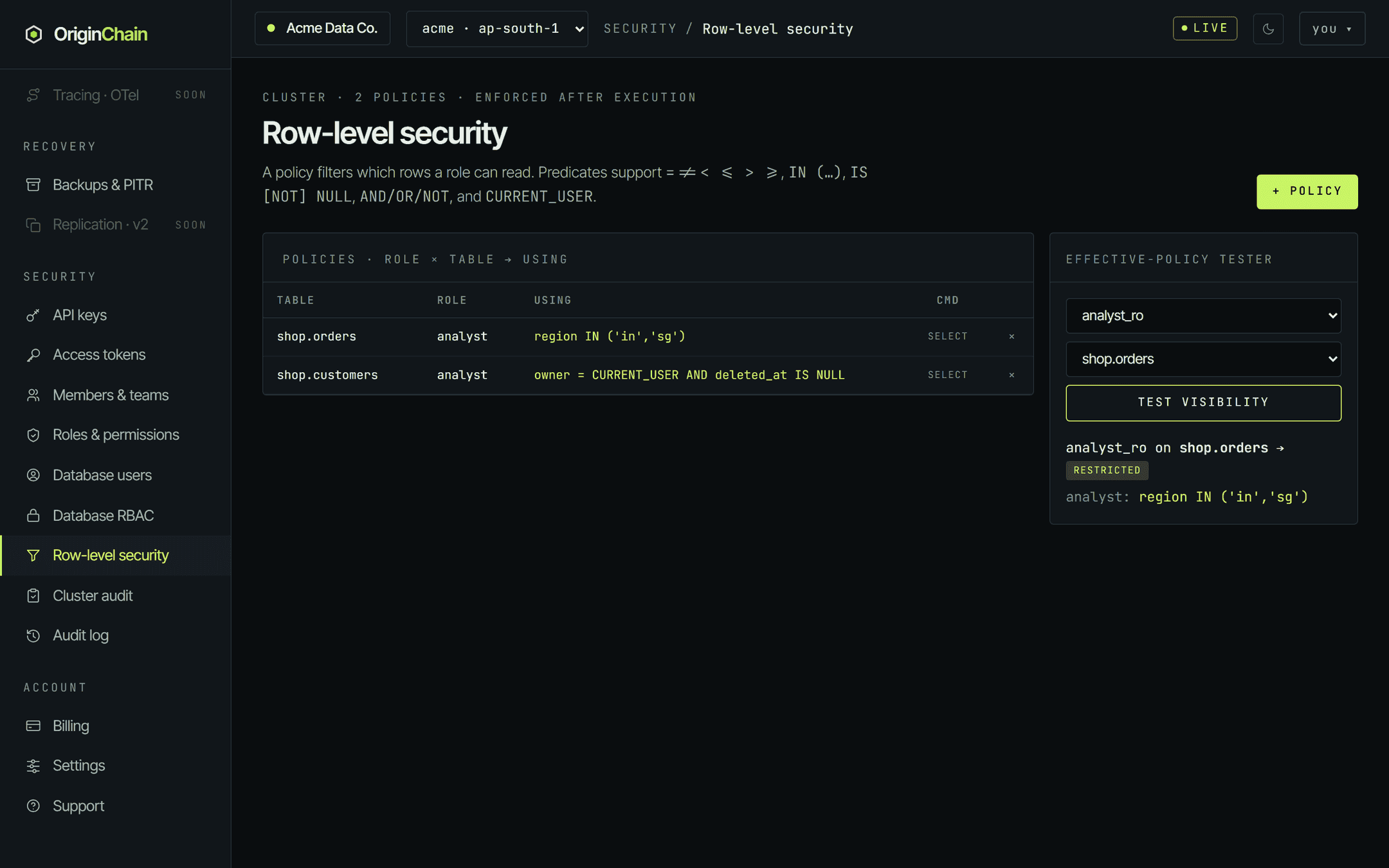
+ Policy asks for a table, a role and the predicate; all three are required. The CMD column shows which command the policy covers — policies created from this page cover reads. The effective-policy tester takes a database user and a table and reports one of three verdicts: superuser — sees all, restricted, or unrestricted, listing the policies that apply.
Policies apply to reads made by a request that identifies a database user. A request that carries only the database bearer is the administrative superuser and sees every row — the tester says so in as many words. Row filtering runs before column masking, so a policy sees real cell values even on columns that will be masked in the response.
Cluster audit.
Security → Cluster audit is the append-only, hash-chained record of authorization changes on the database. Each entry carries the previous entry's hash, so altering or deleting anything in the past invalidates every hash after it.
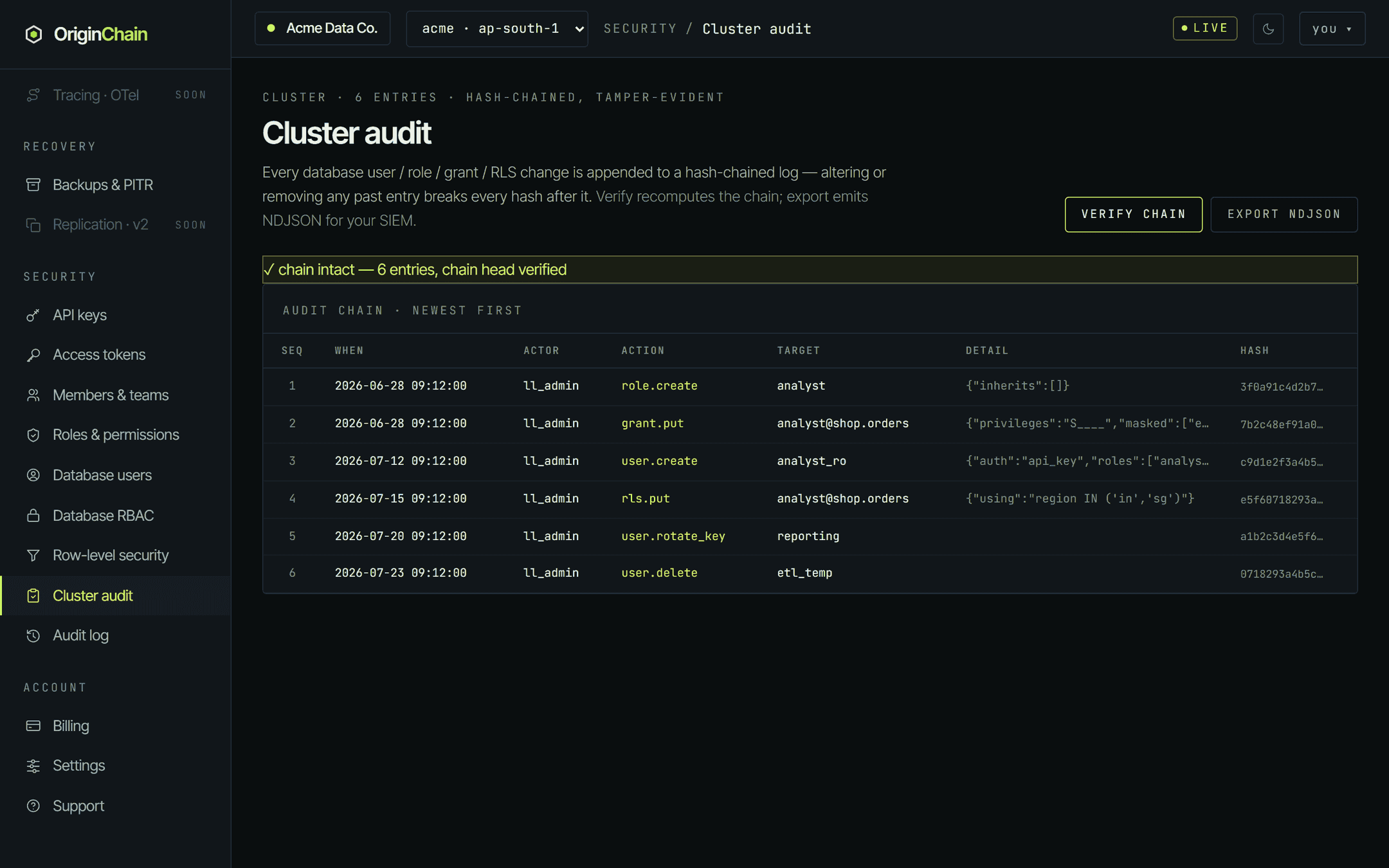
Every row is one authorization change. The actions you will see are
user.create,
user.delete,
user.rotate_key,
role.create,
role.delete,
grant.put,
grant.revoke,
rls.put and
rls.delete. The
target names what changed — a username, or
role@object for a grant or policy — and
detail holds the change itself as JSON. Hover a truncated hash or detail cell
to see it in full.
Verify chain recomputes every link and reports either chain intact or a tamper verdict naming the first broken sequence number. Export NDJSON downloads the whole chain, one JSON object per line, for a SIEM or log pipeline.
This log covers the database's authorization surface only. Account-level activity — members joining, databases being created, billing changes — lives in the separate org Audit log at the bottom of the Security group.
What's enforced, and what isn't.
Access-control screens are easy to over-read, so here is the honest boundary of the database layer as the console ships it today. Treat everything not on the enforced list as a record of intent — useful for review and audit, not as a barrier.
| control | applies when |
|---|---|
| IP access list | Always, on every connection to the endpoint, once the list is non-empty. Independent of any credential. |
| Read-only personal token | Always, for that token. Write requests are refused; the level follows your current org role. |
| Database-user identity | Only when the request sends the database-user headers. Without them the caller is the administrative superuser. |
| SELECT grants, column masking, row-level policies | On reads by an identified database user. A user without SELECT on a table is refused; masked columns come back as •••••; policy predicates drop rows. |
| Insert / update / delete / references grants | Recorded on the grant and shown in the privilege matrix. They are not a write barrier today — to stop writes, use a read-only token or a separate database. |
If you need a guarantee stronger than the row above, say so before you design around it — write us at support@originchain.ai.