
A falling counter deserves review, but it should not erase a missing observation. Classify each reading with its evidence so operators can distinguish a possible reset from a gap in the measurement stream.
Executed synthetic walkthrough: the report was run in the actual OriginChainDB console, exported as CSV and validated by the local application adapter. Three reviewed light-mode screenshots are included.

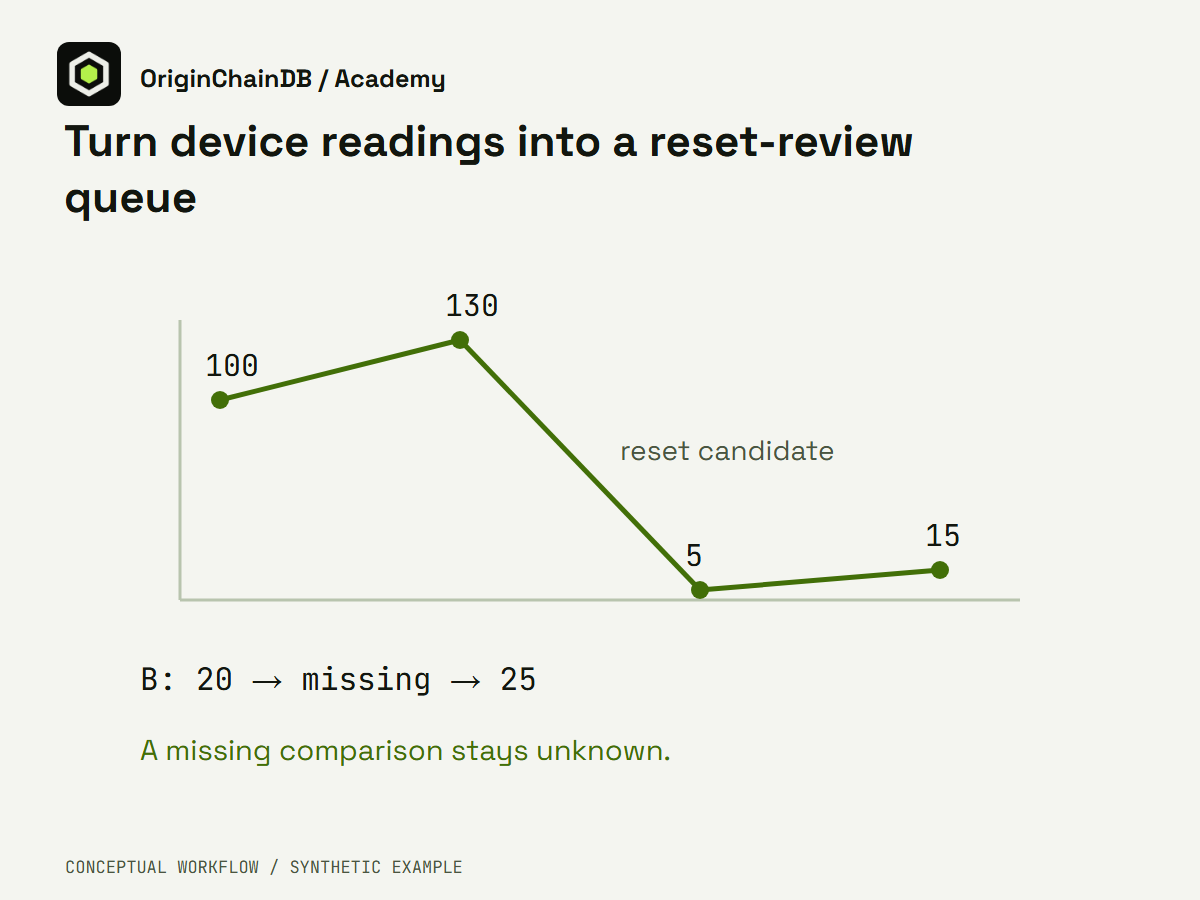
Conceptual illustration of the synthetic application workflow. Light PNG · Dark PNG. This is not a product screenshot.
The data contract
Order observations within each device by a stable sequence. Compare with the immediately preceding observation, preserving nulls. A negative delta is a reset candidate. If either side of the comparison is absent, the change is unknown rather than zero.
Prepare the fixture
Device A reads 100, 130, 5 and 15. Device B reads 20, an absent observation and 25. The first reading establishes a baseline. This fixture makes a reset candidate and two comparisons affected by missing data visible without using real device names.
Use Python 3 for the local example. It uses only the standard library and does not require credentials. For the live extension, use a dedicated demonstration namespace and only the permissions needed by the chosen client. Keep connection values outside source files, logs and recordings.
Download the runnable example · Inspect expected local output
python example.pyBuild the recorded workflow
-
Load the seven synthetic readings into a fresh namespace. Preserve device ID, sequence, nullable reading and the explicit predecessor ID supplied by this fixed fixture.
-
Inspect the stored sequence. The report uses a LEFT self-join on the predecessor ID to retain both sides of each comparison. This demonstration does not rely on a database window function or skip missing measurements.
-
Run the comparison report and export all seven rows. Pass the downloaded CSV to route-export.py. It checks same-device predecessor order and verifies each classification against the two returned reading values.
-
Route A3 to reset review and B2/B3 to missing-comparison review. Keep baseline and ordinary-increase rows alongside those findings so an operator can understand the sequence.
Inspect the executable rule
data = {"A":[100,130,5,15],"B":[20,None,25]}
result = []
for device,values in data.items():
    for i,value in enumerate(values):
        previous = values[i-1] if i else None
        reason = "baseline" if i == 0 else "missing_comparison" if value is None or previous is None else "reset_candidate" if value < previous else "ordinary_increase"
        result.append({"id":f"{device}{i+1}","reason":reason})
assert [r["id"] for r in result if r["reason"]=="reset_candidate"] == ["A3"]
assert [r["id"] for r in result if r["reason"]=="missing_comparison"] == ["B2","B3"]
Interpret the local result
A3 is a reset candidate because 5 is below 130. B2 and B3 have an unknown comparison because one side is missing. A4 shows an ordinary increase from 5 to 15; this comparison alone does not establish why the earlier reading fell. The classifier intentionally does not carry B1 across the gap and call B3 a normal five-unit increase.
Executed local output
[
  {
    "id": "A1",
    "reason": "baseline"
  },
  {
    "id": "A2",
    "reason": "ordinary_increase"
  },
  {
    "id": "A3",
    "reason": "reset_candidate"
  },
  {
    "id": "A4",
    "reason": "ordinary_increase"
  },
  {
    "id": "B1",
    "reason": "baseline"
  },
  {
    "id": "B2",
    "reason": "missing_comparison"
  },
  {
    "id": "B3",
    "reason": "missing_comparison"
  }
]
The recorded SQL-to-application walkthrough
The actual report and CSV classify A3 as reset_candidate because its value 5 follows 130. B2 and B3 remain missing_comparison because one reading in each adjacent pair is null. A4 increases from 5 to 15. The adapter checks these classifications and the predecessor relationship; it does not carry B1 across B2 or diagnose the physical cause of A3’s decrease.
| Reading | Observed classification |
|---|---|
| A1 | baseline |
| A2 | ordinary_increase |
| A3 | reset_candidate |
| A4 | ordinary_increase |
| B1 | baseline |
| B2 | missing_comparison |
| B3 | missing_comparison |
The following stills come from actual native console captures. Private fields were blurred before encoding. Open an image for the full-size query or result. Timing shown by the console is one observation, not a benchmark.
The operation and result screenshots use a separately executed focused SQL projection for readability. The actual CSV retains the full report columns; its values have not been replaced with a local calculation.
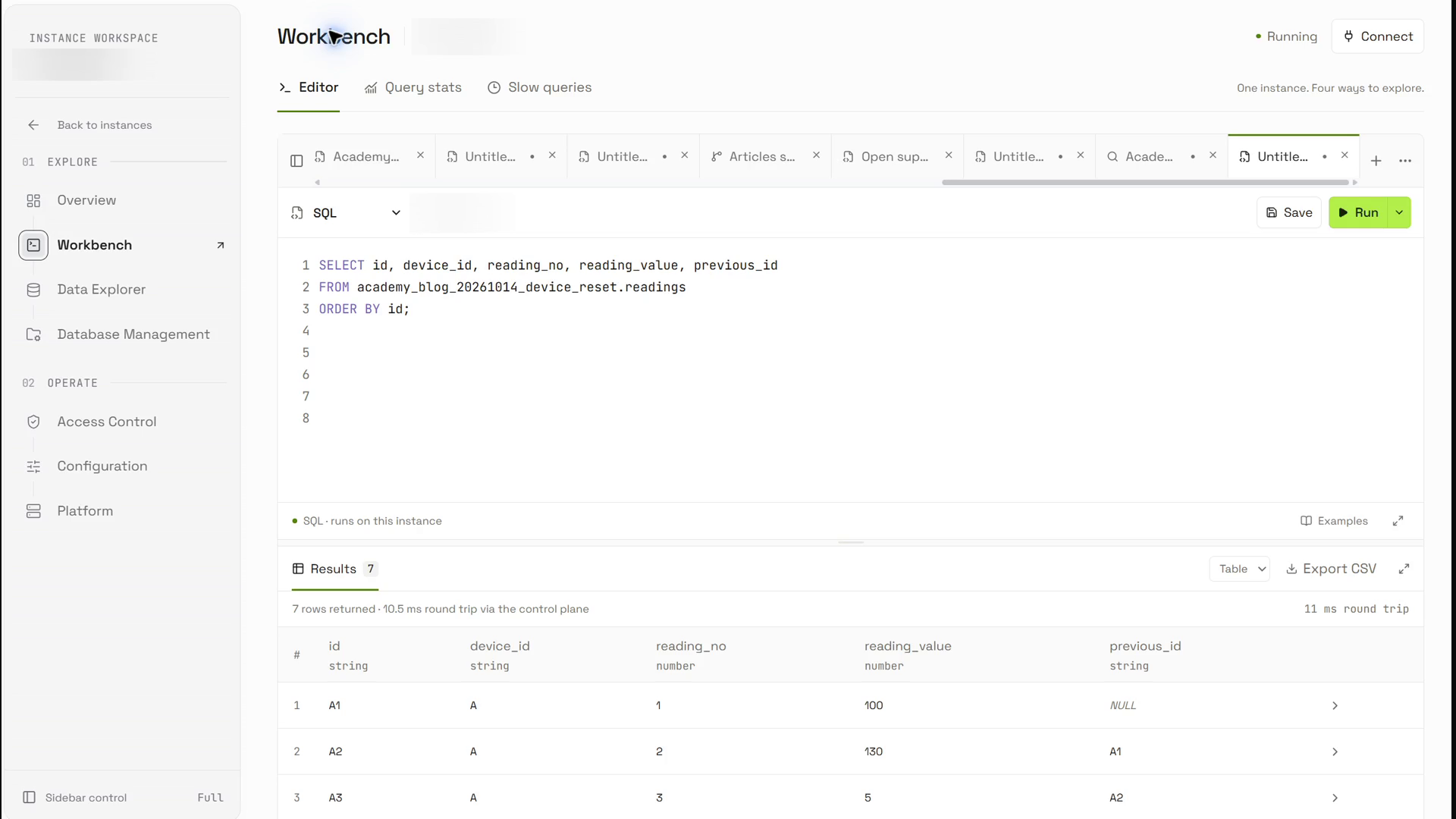
Seven stored readings preserve the two device sequences and the explicit null measurement at B2.
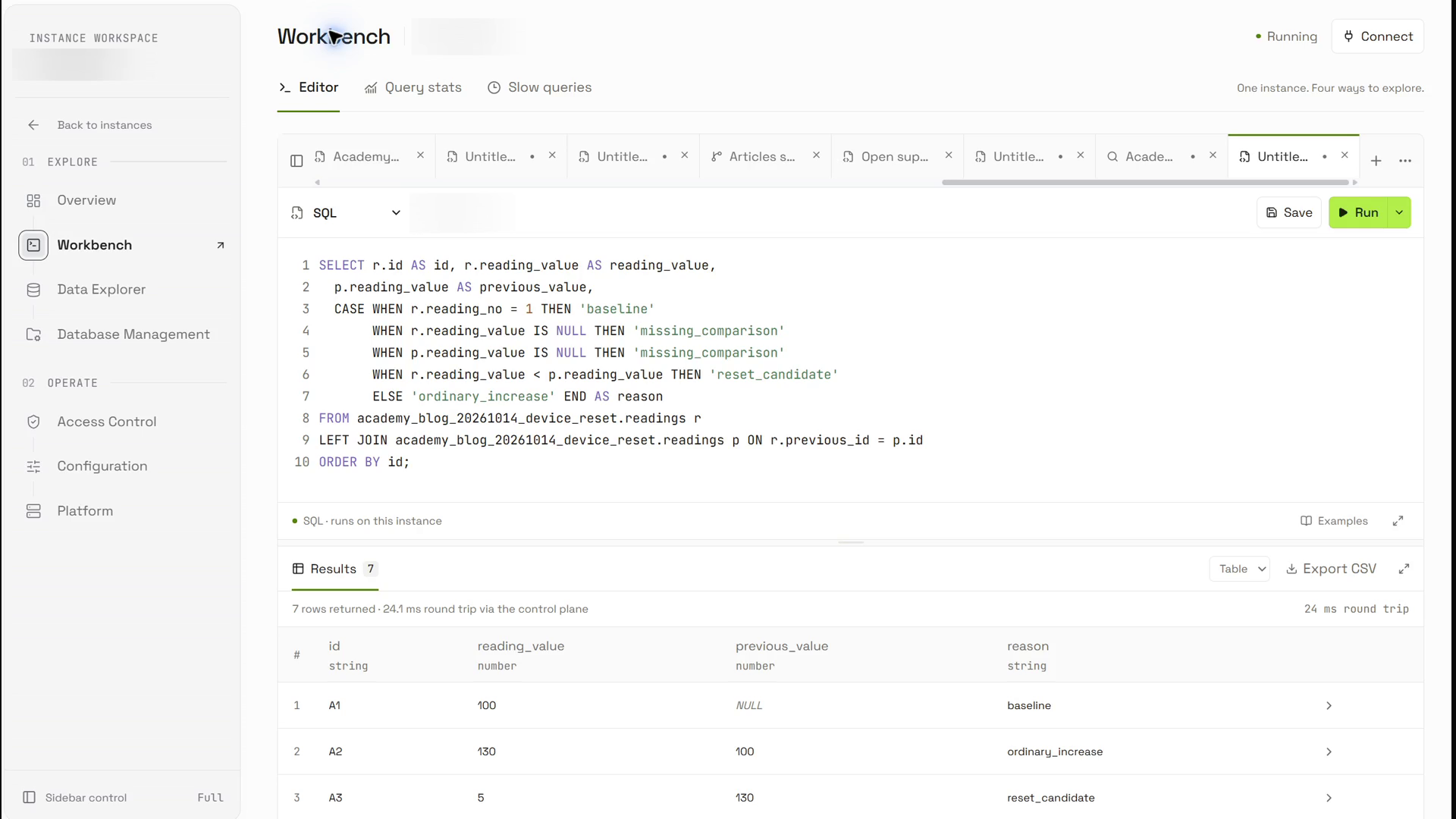
The separately executed four-column projection uses the same self-join and CASE classification as the full report. Its explicit predecessor comparison preserves nulls.
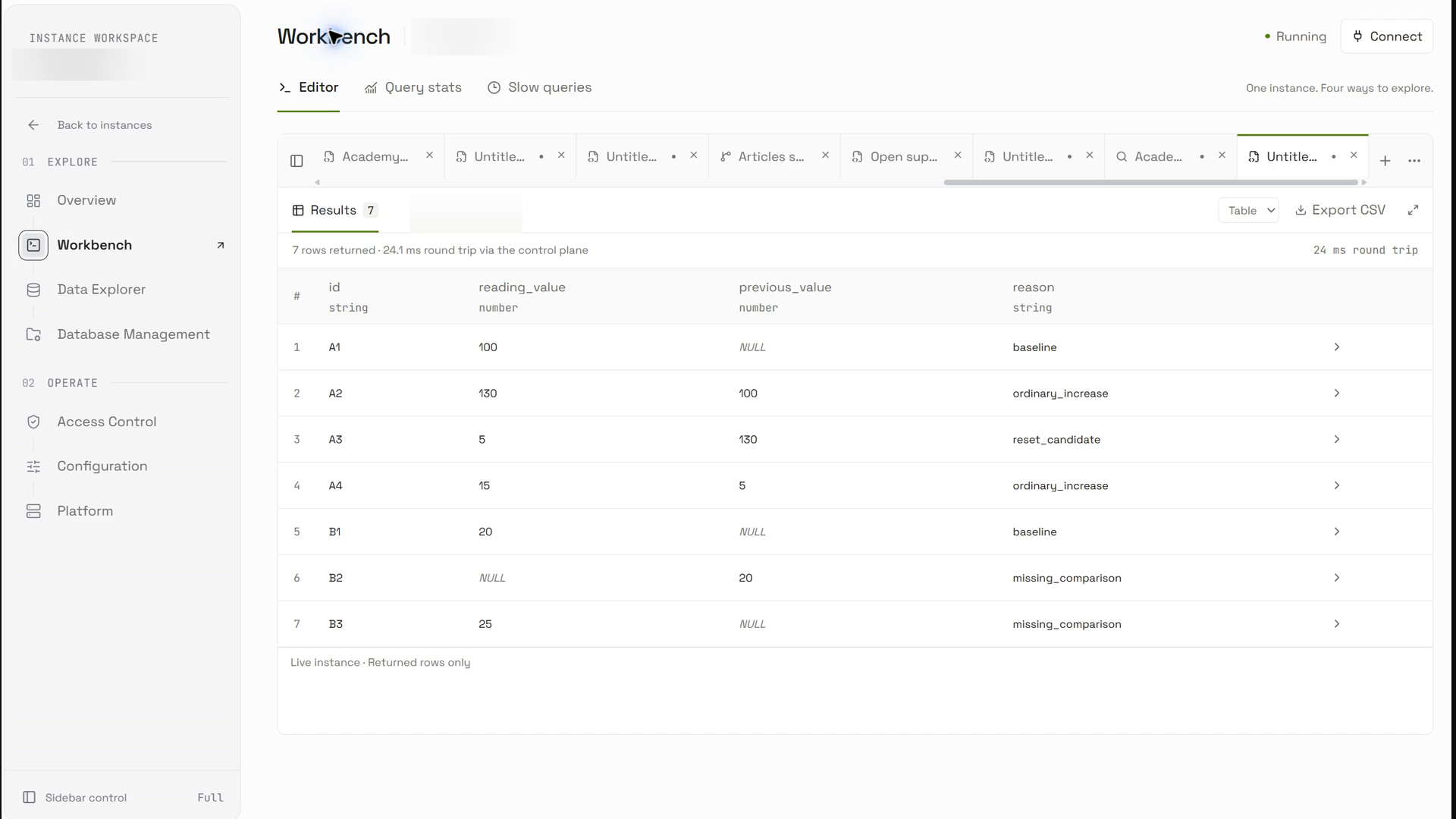
A separately executed focused projection shows all seven reading IDs, current and previous values, and reasons. A3 is a reset candidate; B2/B3 are missing comparisons. The downloaded CSV preserves the full ten-column report.
Reproduce the verified handoff
Executed fixture and report SQL · Actual downloaded CSV · CSV adapter · Executed adapter output · Verification receipt.
Choose a new demonstration namespace for a repeat run. Execute the setup statements, inspect the stored input rows, and then execute this report. Export its complete successful result and pass that actual file to the adapter.
SELECT r.id AS id, r.device_id AS device_id, r.reading_no AS reading_no, r.reading_value AS reading_value, r.previous_id AS previous_id, p.id AS resolved_previous_id, p.device_id AS previous_device_id, p.reading_no AS previous_reading_no, p.reading_value AS previous_value, CASE WHEN r.reading_no = 1 THEN 'baseline' WHEN r.reading_value IS NULL THEN 'missing_comparison' WHEN p.reading_value IS NULL THEN 'missing_comparison' WHEN r.reading_value < p.reading_value THEN 'reset_candidate' ELSE 'ordinary_increase' END AS reason FROM academy_blog_20261014_device_reset.readings r LEFT JOIN academy_blog_20261014_device_reset.readings p ON r.previous_id = p.id ORDER BY id;python route-export.py export.csvThe adapter checks a local CSV and produces application output. It performs no network calls or external actions. The packaged synthetic-contract-input.csv is a separate offline test input; it is not the actual console export.
Diagnose and recover safely
A reset candidate can also mean a replaced device, a rollover, an out-of-order event or invalid data. Check the device lifecycle and event order before changing the baseline. If timestamps tie, add an explicit tie-breaker instead of relying on storage order.
Boundaries and the next improvement
This queue supports human diagnosis. It does not calculate billing or assert a device fault. Add a documented rollover range only when the device contract supplies one, and test that rule separately from ordinary resets. Late observations need a re-evaluation policy for affected neighbors.
The practical takeaway
The useful result is a reviewable comparison, not an automatic fault diagnosis. Keep the immediate predecessor and both source values with each finding. Evaluate rollover rules, late observations and lifecycle changes separately before applying the rule to a real device stream.
Continue with the product reference
OriginChainDB SQL documentation. The integration design was checked against the local official documentation and Python client source on 9 October 2026. Source inspection does not establish the behavior of the current deployment.
Local Python execution: sanitized receipt. The recorded SQL-to-CSV scope is verified above. No customer data, performance benchmark or production deployment is claimed.