
SQL · Find the facts
The question
Which onward flights leave after the revised arrival?
Filter affected segments, times and candidate availability.
Explore SQLAirlines & aviation
Connect flight updates, booking segments and carrier policies. Help support agents find affected connections and check the passenger’s options.
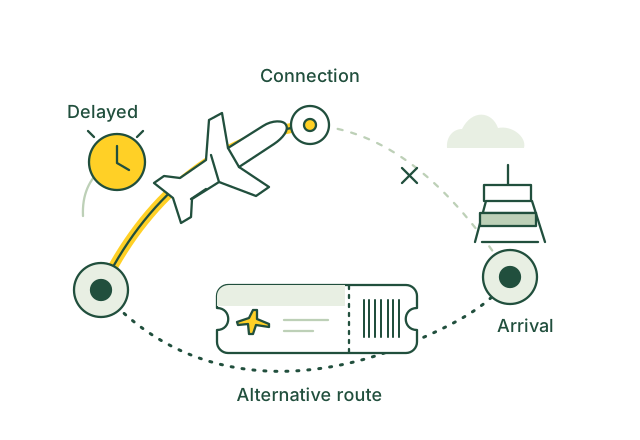
Review a missed connection and check an alternative route.
Illustrative use case01 / Use case guide
Compare the data models behind everyday industry tasks, from finding records to following connections.
Suggested model combination
Scroll across to compare all four models| Use case | How the data models help | SQL | Vector | Graph | Full-text | Source |
|---|---|---|---|---|---|---|
| Identify connections at risk An inbound delay leaves a passenger with little time for an onward flight. | Graph follows the booking's connected flight segments; SQL compares updated arrivals, departures and gate transfer times for agent review. | SQL included | Vector not needed for this example | Graph included | Full-text not needed for this example | |
| Find passenger rebooking options An agent needs alternatives after a passenger misses a connection. | Graph finds onward journey options; SQL checks times and reported availability; Full-text retrieves applicable rebooking rules before booking-system confirmation. | SQL included | Vector not needed for this example | Graph included | Full-text included | |
| Find delay assistance guidance An agent needs the carrier's meal or hotel policy for a disrupted journey. | Vector matches the passenger's situation to guidance; SQL selects the carrier and disruption category; Full-text retrieves the applicable assistance conditions. | SQL included | Vector included | Graph not needed for this example | Full-text included | |
| Review flight refund eligibility A passenger declines a disrupted itinerary and asks about a refund. | SQL retrieves cancellation, schedule-change and acceptance records; Full-text finds current refund conditions for an authorized agent to review. | SQL included | Vector not needed for this example | Graph not needed for this example | Full-text included | |
| Locate delayed checked bags A passenger needs the latest status of a checked bag. | Graph connects bag tags to the passenger's flight segments; SQL retrieves the latest bag tracking event and claim status. | SQL included | Vector not needed for this example | Graph included | Full-text not needed for this example | |
| Prepare baggage expense claims A passenger needs to submit receipts against the correct baggage incident. | Graph links receipts to the bag incident and trip; SQL totals submitted expenses; Full-text retrieves claim instructions for staff review. | SQL included | Vector not needed for this example | Graph included | Full-text included | |
| Coordinate airport mobility assistance A requested wheelchair service must follow the passenger through connecting airports. | Graph links assistance requests to journey segments and airports; SQL checks request status and updated connection times for service staff. | SQL included | Vector not needed for this example | Graph included | Full-text not needed for this example | |
| Check travel document requirements A check-in agent needs current passport and visa requirements for an itinerary. | Graph follows destination and transit points; SQL filters nationality and travel dates; Full-text retrieves document requirements for staff confirmation. | SQL included | Vector not needed for this example | Graph included | Full-text included | |
| Explain ticket change rules A passenger wants to understand restrictions before changing a booking. | SQL retrieves ticket and fare details; Full-text locates the applicable change restrictions and fare-difference conditions for the agent. | SQL included | Vector not needed for this example | Graph not needed for this example | Full-text included | |
| Find special baggage guidance A traveller asks how to carry an unusual item. | Vector matches the item description to baggage categories; SQL checks recorded size and weight limits; Full-text retrieves packing and acceptance conditions. | SQL included | Vector included | Graph not needed for this example | Full-text included |
Use the query interfaces you need, then connect their results through shared record IDs in your application.
These sources describe real industry workflows. The model combinations above are proposed OriginChainDB designs, not customer deployment claims.
02 / A closer look
An inbound delay puts a connection at risk. A support agent needs the linked itinerary, updated flight information, available alternatives and the policy that applies to this disruption. The illustration uses a synthetic booking.
Flight updates and booking records arrive from different systems.
A single disrupted segment affects connecting journeys.
Rebooking guidance varies by carrier and circumstances.
Follow connected flight segments, retrieve current status and search the applicable carrier policy. Verify candidate alternatives with the booking system before offering them.
03 / Queries
Select a model to see the question it answers.
The question
Filter affected segments, times and candidate availability.
Explore SQLThe question
Find approved guidance that matches a traveller's situation.
Explore VectorThe question
Connect journeys, bookings and dependent flight segments.
Explore GraphThe question
Look up exact waiver codes and policy conditions.
Explore Full-textUse shared record IDs to combine results from the different query interfaces in your application.
04 / Implementation
Use one hub, authorized flight data and synthetic bookings. Agree which options agents can offer and which cases need specialist handling.
Keep flight, segment and booking IDs, update timestamps and policy effective dates. Refresh records and search indexes when sources change.
Combine flight filters, journey links and carrier guidance. Show source times and policy citations. Recheck seats and rules with the booking service.
Test changing availability and unsuitable suggestions with support staff. Pilot with authorized agents while retaining existing booking and approval controls.
05 / Testing
Compare these results with your current process before rollout.
Check how many proposed options pass current availability and policy validation.
Measure the time an agent needs to find the affected connection and relevant guidance.
Track results superseded by a newer flight, seat or policy update.
06 / Sources
Published projects and reference material relevant to this use case.
United Airlines
United announced connection information including countdowns, gate directions, flight status and rebooking options when a connection is missed.
Read the sourceU.S. Department of Transportation
The dashboard compares airlines' commitments to passengers during controllable cancellations and delays, showing that available assistance differs between carriers.
Read the sourceThese are industry references, not OriginChainDB customer stories. The implementation above is a proposed example.
Build with OriginChainDB