
SQL · Find the facts
The question
Show the active intake procedure for this site.
Filter by site, service, approval status and effective date.
Explore SQLHealthcare
Retrieve current nonclinical procedures by service and location. Show the document version and responsible team, using synthetic requests for the pilot.
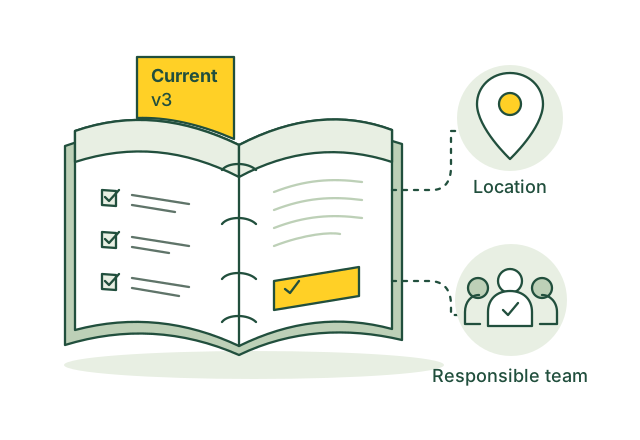
Find the current intake procedure and the team responsible.
Illustrative use case01 / Use case guide
Compare the data models behind everyday industry tasks, from finding records to following connections.
Suggested model combination
Scroll across to compare all four models| Use case | How the data models help | SQL | Vector | Graph | Full-text | Source |
|---|---|---|---|---|---|---|
| Find referral service options A coordinator needs service locations matching an already approved referral. | Vector matches service wording; SQL filters location and appointment availability; Graph links services to providers and sites for staff review. | SQL included | Vector included | Graph included | Full-text not needed for this example | |
| Find available appointment slots An accepted referral is waiting for an appointment. | SQL lists available slots for the required service; Graph connects the referral, service and booking request for scheduling staff. | SQL included | Vector not needed for this example | Graph included | Full-text not needed for this example | |
| Follow up unbooked referrals Referral staff need to find requests still waiting for a booking. | SQL filters referrals by booking state and age; Graph connects each request to contact attempts and the responsible provider. | SQL included | Vector not needed for this example | Graph included | Full-text not needed for this example | |
| Check referral document completeness A referral is missing an attachment required by the receiving service. | Full-text retrieves the service's submission instructions; Graph links the referral to attachments; SQL checks required document flags and submission dates. | SQL included | Vector not needed for this example | Graph included | Full-text included | |
| Review insurance coverage details Registration staff need the latest eligibility and benefit response before a visit. | SQL retrieves the latest payer response, including service coverage, deductibles, copayments and network differences, for registration staff. | SQL included | Vector not needed for this example | Graph not needed for this example | Full-text not needed for this example | |
| Check prior authorization requirements Administrative staff need the payer's documentation checklist for a planned service. | SQL selects the payer, service and current requirement version; Full-text retrieves the required document list for staff review. | SQL included | Vector not needed for this example | Graph not needed for this example | Full-text included | |
| Track prior authorization responses Staff need to see whether a request was approved, denied or returned for more information. | SQL filters authorization responses by status and date; Graph connects each response to its request and requested supporting documents. | SQL included | Vector not needed for this example | Graph included | Full-text not needed for this example | |
| Check outstanding claim status Billing staff need the latest payer status for unpaid claims. | SQL lists unpaid claims and response timestamps; Graph connects each claim to its status inquiries and payer replies. | SQL included | Vector not needed for this example | Graph included | Full-text not needed for this example | |
| Explain claim payment adjustments Billing staff need to understand why a claim payment differs from the billed amount. | SQL retrieves adjustment amounts at claim and line level; Full-text finds the supplied reason codes and their published explanations. | SQL included | Vector not needed for this example | Graph not needed for this example | Full-text included | |
| Reconcile remittances with claims A remittance covers several claims and must be matched to the right accounts. | Graph links remittances to claims and claim lines; SQL compares payments and adjustments with the recorded account balances. | SQL included | Vector not needed for this example | Graph included | Full-text not needed for this example |
Use the query interfaces you need, then connect their results through shared record IDs in your application.
These sources describe real industry workflows. The model combinations above are proposed OriginChainDB designs, not customer deployment claims.
02 / A closer look
A coordinator needs the intake procedure for a particular service and site. The same process has several names, an older document is still searchable, and responsibility has moved to another team. This demonstration uses synthetic requests and nonclinical procedures.
Staff describe the same process in different ways.
Retired procedures can appear alongside current versions.
Service, site and process ownership need to stay connected.
Search staff wording against approved procedures, then return the active version and its owner. Retired documents should be excluded from current guidance.
03 / Queries
Select a model to see the question it answers.
The question
Filter by site, service, approval status and effective date.
Explore SQLThe question
Match staff wording to approved operational guidance.
Explore VectorThe question
Link services, locations, procedures and accountable teams.
Explore GraphThe question
Locate exact form codes and wording in approved documents.
Explore Full-textUse shared record IDs to combine results from the different query interfaces in your application.
04 / Implementation
Use approved operational procedures and synthetic requests with no patient information. Define access rules and questions that require staff help.
Store procedure IDs, approval dates and source links. Connect services and teams. Retire old versions and refresh text and vector indexes after changes.
Apply access and version filters before retrieving passages. Display the current document and owner. Route missing or conflicting guidance to staff.
Test retired documents, ambiguous questions and restricted access. Keep staff review during the pilot and remain within the approved nonclinical scope.
05 / Testing
Compare these results with your current process before rollout.
Check how often results point to the active procedure for the requested service and site.
Verify that each answer is supported by the linked document and version.
Test that users cannot retrieve documents outside their authorized scope.
06 / Sources
Published projects and reference material relevant to this use case.
Google Cloud & Mayo Clinic
The organizations announced Mayo Clinic as an early adopter exploring enterprise search to help staff find information and support healthcare and administrative workflows.
Read the sourceU.S. Department of Health & Human Services
HHS explains that cloud providers handling electronic protected health information for covered entities or business associates can have HIPAA obligations, including an appropriate business associate agreement.
Read the sourceThese are industry references, not OriginChainDB customer stories. The implementation above is a proposed example.
Build with OriginChainDB