
SQL · Find the facts
The question
Which scheduled instalments have no matching posted receipt?
Compare instalments and receipts.
Explore SQLNBFCs
Bring instalment records, payment receipts and borrower messages into one case view. Help servicing teams check a discrepancy before contacting the borrower again.
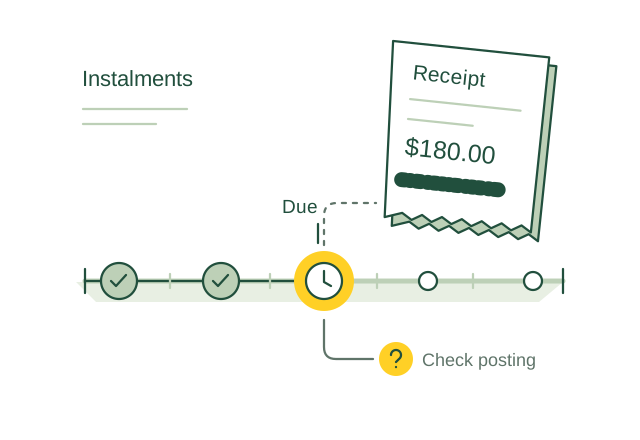
Compare a payment receipt with an instalment still marked overdue.
Illustrative use case01 / Use case guide
Compare the data models behind everyday industry tasks, from finding records to following connections.
Suggested model combination
Scroll across to compare all four models| Use case | How the data models help | SQL | Vector | Graph | Full-text | Source |
|---|---|---|---|---|---|---|
| Instalment receipt reconciliation Servicing teams need to investigate a paid instalment that still appears overdue. | SQL compares scheduled instalments with posted receipts, while Full-text locates payment references in borrower messages. | SQL included | Vector not needed for this example | Graph not needed for this example | Full-text included | |
| Microfinance household obligation review Credit officers need a complete view of a household's declared income and existing repayments. | SQL totals recorded income and repayments, while Graph connects verified household members and loan obligations for officer review. | SQL included | Vector not needed for this example | Graph included | Full-text not needed for this example | |
| Gold collateral inventory checks Branch auditors need to reconcile pledged gold records with custody and verification records. | SQL compares recorded weights and valuations, Graph links pledged items to loans and custody records, and Full-text retrieves audit findings. | SQL included | Vector not needed for this example | Graph included | Full-text included | |
| Vehicle repossession file review Authorized reviewers need the contract, notices and repayment history before considering repossession. | SQL shows arrears and notice dates, Graph links the vehicle and case records, and Full-text retrieves contract clauses for human review. | SQL included | Vector not needed for this example | Graph included | Full-text included | |
| Co lending share reconciliation Partner operations teams need to reconcile borrower payments with each lender's recorded share. | SQL compares escrow movements and allocated amounts, while Graph connects borrower loans with partner shares and agreements. | SQL included | Vector not needed for this example | Graph included | Full-text not needed for this example | |
| Securitisation pool performance review Servicing teams need to trace pool reports back to the underlying loan payments. | SQL aggregates collections and arrears, while Graph traces pool membership and servicing records back to individual loans. | SQL included | Vector not needed for this example | Graph included | Full-text not needed for this example | |
| Funding maturity mismatch review Treasury teams need to compare expected loan inflows with borrowing repayments. | SQL groups cash flows into maturity periods, while Full-text retrieves funding terms behind timing assumptions. | SQL included | Vector not needed for this example | Graph not needed for this example | Full-text included | |
| Factoring invoice evidence review Receivables teams need accepted invoice evidence before reviewing a financing request. | SQL checks invoice amounts and status, Graph links sellers, buyers and factoring units, and Full-text retrieves acceptance evidence. | SQL included | Vector not needed for this example | Graph included | Full-text included | |
| Collection monitoring consent checks Collections teams need to confirm the permitted purpose and validity of account monitoring consent. | SQL checks consent status and dates, while Graph links each account-data request to its borrower, loan and consent record. | SQL included | Vector not needed for this example | Graph included | Full-text not needed for this example | |
| Repayment mandate failure investigation Servicing teams need to distinguish failed debit instructions from missing repayment account updates. | SQL groups debit failure codes, Graph connects mandates to repayment accounts, and Vector retrieves similar service notes for staff review. | SQL included | Vector included | Graph included | Full-text not needed for this example |
Use the query interfaces you need, then connect their results through shared record IDs in your application.
These sources describe real industry workflows. The model combinations above are proposed OriginChainDB designs, not customer deployment claims.
02 / A closer look
A servicing team sees an unpaid instalment. The borrower says they paid, a receipt was uploaded separately, and the account record has not been reconciled. The team needs a reliable case history before contacting the borrower again.
Receipts, ledger entries and service notes arrive on different timelines.
The same borrower can have multiple facilities and service requests.
Monitoring data must stay within its permitted purpose and validity.
Compare the scheduled instalment with posted receipts. Link the relevant messages and service requests, and flag stale or conflicting records for the servicing team.
03 / Queries
Select a model to see the question it answers.
The question
Compare instalments and receipts.
Explore SQLThe question
Find related service descriptions.
Explore VectorThe question
Build the borrower’s case context.
Explore GraphThe question
Find the precise reference.
Explore Full-textUse shared record IDs to combine results from the different query interfaces in your application.
04 / Implementation
Start with masked payment-posting cases. Define the required borrower data, authorized roles and permitted monitoring purposes.
Assign borrower, facility, receipt and case IDs. Keep timestamps, corrections and consent references. Refresh indexes when notes change.
Compare repayment status with SQL, follow facility links and search receipt references. Your application flags stale or conflicting records for verification.
Replay resolved cases with duplicate receipts, late postings and expired permissions. Have servicing staff approve the results before use in customer follow-ups.
05 / Testing
Compare these results with your current process before rollout.
Track verified mismatches separately from cases caused by delayed updates.
Measure avoidable follow-ups for cases whose supporting receipt already existed.
Test how quickly corrected data appears and whether expired or out-of-scope evidence is withheld.
06 / Sources
Published projects and reference material relevant to this use case.
Setu & Snapmint
Setu describes a Snapmint onboarding flow with separate consent for an initial underwriting fetch and recurring monitoring fetches. This is a documented Account Aggregator example, not an OriginChainDB customer deployment.
Read the sourceSahamati
Sahamati describes Account Aggregators as a way to share financial information between institutions with the individual’s consent. Its current materials cover credit underwriting and monitoring across the ecosystem.
Read the sourceThese are industry references, not OriginChainDB customer stories. The implementation above is a proposed example.
Build with OriginChainDB