
SQL · Find the facts
The question
Which disclosed facts belong to this issuer and quarter?
Filter filings and reported facts by issuer, period and unit.
Explore SQLCapital markets
Find reported figures, relevant passages and verified entity relationships. Keep each result tied to its filing, reporting period and original disclosure.
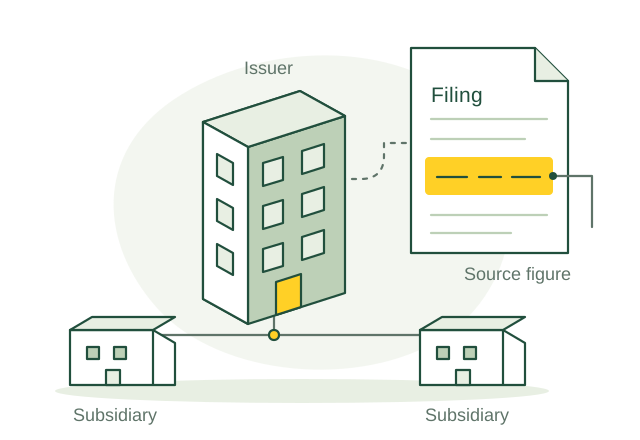
Connect an issuer’s filing to the entities it describes.
Illustrative use case01 / Use case guide
Compare the data models behind everyday industry tasks, from finding records to following connections.
Suggested model combination
Scroll across to compare all four models| Use case | How the data models help | SQL | Vector | Graph | Full-text | Source |
|---|---|---|---|---|---|---|
| Reported financial fact comparison Compare issuer disclosures without mixing reporting periods, units or amendments. | Use SQL to select facts by issuer, period and unit, and Full-text to retrieve the corresponding filing passages for verification. | SQL included | Vector not needed for this example | Graph not needed for this example | Full-text included | |
| Financing disclosure research Find passages explaining an issuer's liquidity, financing needs and uncertainties. | Use SQL to scope issuer filings, Vector to retrieve related financing discussions, and Full-text to locate named facilities and exact terms. | SQL included | Vector included | Graph not needed for this example | Full-text included | |
| Legal entity parent review Inspect reported accounting-parent relationships while preserving dates and exceptions. | Use SQL to filter dated LEI records and Graph to trace reported direct and ultimate accounting-parent links without inferring missing relationships. | SQL included | Vector not needed for this example | Graph included | Full-text not needed for this example | |
| Corporate action evidence review Connect an event announcement with its recorded entitlements and instructions. | Use SQL to select event dates and statuses, Graph to trace event–security–instruction links, and Full-text to retrieve announcement terms. | SQL included | Vector not needed for this example | Graph included | Full-text included | |
| Trade allocation exception review Investigate mismatches between an institutional trade block and its allocations. | Use SQL to compare recorded quantities and matching statuses, and Graph to trace allocations back to their trade block and counterparties. | SQL included | Vector not needed for this example | Graph included | Full-text not needed for this example | |
| Settlement exception investigation Assemble trade status and correspondence across custodians when settlement breaks. | Use SQL to select unsettled items, Graph to trace the custody chain, and Full-text to retrieve relevant exception messages. | SQL included | Vector not needed for this example | Graph included | Full-text included | |
| Settlement instruction change review Identify trades affected by an amended or incomplete standing settlement instruction. | Use SQL to select instruction versions and pending trades, and Graph to trace the account, custodian and instruction dependencies. | SQL included | Vector not needed for this example | Graph included | Full-text not needed for this example | |
| Collateral agreement term review Find agreement terms behind a disagreement over a margin call. | Use SQL to retrieve the recorded call inputs and agreement version, and Full-text to locate threshold, currency and transfer-amount clauses. | SQL included | Vector not needed for this example | Graph not needed for this example | Full-text included | |
| Margin dispute investigation support Investigate missing trades, valuation differences and collateral discrepancies in a disputed call. | Use SQL to compare supplied positions and balances, Graph to trace trade–agreement links, and Vector to retrieve similar resolved dispute notes. | SQL included | Vector included | Graph included | Full-text not needed for this example | |
| Trade report correction tracing Recover the original report and correction history before operations amend a TRACE submission. | Use SQL to select report dates and statuses, Graph to trace correction lineage, and Full-text to locate exact control numbers in supporting messages. | SQL included | Vector not needed for this example | Graph included | Full-text included |
Use the query interfaces you need, then connect their results through shared record IDs in your application.
These sources describe real industry workflows. The model combinations above are proposed OriginChainDB designs, not customer deployment claims.
02 / A closer look
A company files an update about a financing arrangement. An analyst needs the latest disclosed figures, relevant debt wording and the entities involved, while keeping amendments and reporting periods separate.
Company names, tickers and legal entities are not interchangeable.
A reported figure may use a different unit or period.
A current filing can amend or add context to an earlier one.
Match the legal entity and preserve each figure’s unit and reporting period. Search related disclosures and show amendments or conflicting values for the analyst to review.
03 / Queries
Select a model to see the question it answers.
The question
Filter filings and reported facts by issuer, period and unit.
Explore SQLThe question
Retrieve passages describing similar financial themes.
Explore VectorThe question
Follow verified issuer, subsidiary and parent relationships.
Explore GraphThe question
Locate exact facility names, instruments and filing terms.
Explore Full-textUse shared record IDs to combine results from the different query interfaces in your application.
04 / Implementation
Use public or licensed filings for a defined issuer set. Have analysts mark the relevant passages and figures.
Map CIK and LEI identifiers with reviewed rules. Keep accession numbers, periods, units, amendments and source URLs. Maintain explicit entity links and search indexes.
Retrieve facts for the issuer and period, search disclosures and follow verified relationships. Display conflicting values and unresolved entity matches.
Test amendments and company-name changes against original disclosures. Monitor source updates and have analysts review the pilot results.
05 / Testing
Compare these results with your current process before rollout.
Count incorrect and unresolved issuer or parent matches in a reviewed test set.
Verify that each figure retains its source filing, unit and reporting period.
Measure source-to-index delay and the handling of amendments or replaced documents.
06 / Sources
Published projects and reference material relevant to this use case.
U.S. Securities and Exchange Commission
The SEC exposes filing histories and extracted XBRL financial data through EDGAR APIs, including company identifiers, filing metadata and facts with measurement context.
Read the sourceGLEIF
GLEIF’s Level 2 data reports direct and ultimate accounting-consolidating parent relationships, with links between LEI records where those identifiers are available.
Read the sourceThese are industry references, not OriginChainDB customer stories. The implementation above is a proposed example.
Build with OriginChainDB